
Tech
Top Video Conference Tips: Enhance Your Online Meeting Experience

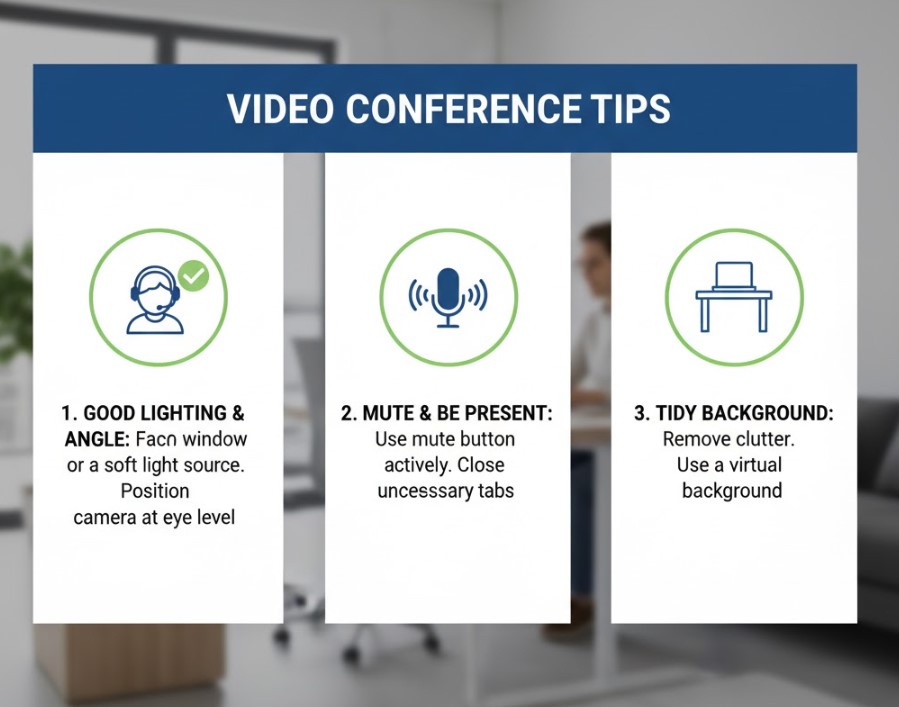
In today’s digital age, video conferencing has become a critical tool for communication in both professional and personal settings. Whether you’re attending a job interview, hosting a business meeting, or catching up with family, knowing how to effectively conduct and participate in video conferences can make a significant difference.
Video conference tips can help you navigate challenges such as poor connection, distractions, or ineffective communication. This article will cover essential video conference tips for various platforms like Zoom, Microsoft Teams, and others, and provide strategies for different contexts, including interviews and meetings.
Let’s dive into the best practices that will ensure your next video conference is a success!
1. Why Video Conference Tips Matter
Video conferencing is not just a trend—it’s the future of communication. According to a report by Gartner, video conferencing has seen exponential growth over the past few years, with companies increasingly relying on it to conduct meetings, interviews, and presentations. As a result, learning video conference tips is crucial for navigating this digital transformation with confidence and professionalism.
The Importance of Video Conference Etiquette
Proper etiquette during video calls can enhance communication, foster professional relationships, and contribute to a more productive meeting. Without these essential video conference tips, participants might experience misunderstandings, distractions, or technical difficulties, all of which can detract from the meeting’s value.
2. General Video Conference Tips for Success
Before we dive into specific platforms and contexts, here are some general video conference tips and tricks that will work across the board:
Ensure a Stable Internet Connection
A reliable internet connection is the backbone of any successful video call. Before your meeting, test your connection speed using an online tool. Aim for at least 1 Mbps for low-quality calls and 3 Mbps or higher for HD video.
Choose the Right Environment
The background of your video conference matters. Opt for a quiet, well-lit space with minimal distractions. Ensure that your camera is positioned to frame you well and that your face is illuminated clearly.
Test Your Equipment Before the Call
There’s nothing more frustrating than joining a call only to realize that your microphone or camera isn’t working. Test your camera, microphone, and speakers ahead of time to avoid technical issues during the meeting.
Dress Professionally
Even if you’re working remotely, dressing professionally is essential, especially during interviews or client-facing meetings. Choose attire that is business-appropriate and avoid distracting patterns.
Also Read: Who Is Malcolm Hardee? All About the Comedian’s Life and Legacy
3. Video Conference Tips for Interviews
Video interviews are becoming increasingly common, and acing them requires special preparation. Here are some video conference tips for interviews that will help you impress your potential employer:
Prepare Your Environment
Ensure your interview space is tidy, quiet, and free from interruptions. Inform your family or housemates about the interview so that they can avoid making noise during the call.
Look at the Camera, Not the Screen
When speaking, try to maintain eye contact by looking directly at the camera. It might feel unnatural, but it creates a better impression than looking at the screen.
Prepare Your Documents
Keep your resume, portfolio, or any other documents you might need during the interview open and accessible on your screen. This will save time if you need to reference something quickly.
4. Microsoft Teams Video Conference Tips
Microsoft Teams is one of the most widely used video conferencing platforms in corporate environments. Here are some Microsoft Teams video conference tips to ensure smooth meetings:
Use the Background Blur Feature
If your background is cluttered, use the background blur feature available in Microsoft Teams. This ensures that your environment doesn’t distract from the conversation.
Learn Keyboard Shortcuts
Mastering keyboard shortcuts in Teams can significantly improve your efficiency during calls. For example, pressing Ctrl+Shift+M mutes and unmutes your microphone, while Ctrl+Shift+O turns your camera on or off.
Leverage Meeting Notes
Teams allows participants to take notes directly within the platform, which can be shared in real time. Use this feature to keep track of important points during meetings.
5. Zoom Video Conference Tips
Zoom is another popular video conferencing platform. Here are some Zoom video conference tips to ensure your meetings are professional and seamless:
Enable Virtual Backgrounds
Zoom offers virtual background options, allowing you to replace your real background with a professional image. This is a great way to avoid distractions and maintain a professional image.
Mute Your Microphone When Not Speaking
One of the most basic but important video conference tips and tricks is to mute your microphone when you’re not speaking. Background noise can be a significant distraction during Zoom calls, so always be mindful of this.
Use Breakout Rooms for Smaller Discussions
If you’re hosting a large meeting, use Zoom’s breakout room feature to split participants into smaller groups for discussions. This can make collaboration more manageable and efficient.
6. Tom Ford Video Conference Tips: How to Look Your Best
Tom Ford is a symbol of sophistication and style, and his advice on video conferences can help you project a polished, professional image. Here are some Tom Ford video conference tips that will elevate your appearance:
Pay Attention to Your Lighting
Tom Ford emphasizes the importance of lighting in creating a flattering look. Ensure your light source is in front of you to avoid harsh shadows and ensure that your face is well-lit.
Dress with Confidence
Ford is known for his sharp, confident style, and dressing similarly for a video call will help you appear more authoritative and professional. Even if it’s just an online meeting, dressing up shows that you take the situation seriously.
Use Grooming to Your Advantage
Take a moment to groom yourself before the call—this can include simple actions like adjusting your hair, checking your collar, or refreshing your makeup. Small details can make a big difference.
7. Interview Video Conference Tips: Presenting Yourself Well
During an interview video conference, it’s crucial to present yourself in the best possible light. Here are more video conference tips for interviews:
Keep Your Body Language Positive
In addition to your spoken words, non-verbal cues are key in interviews. Sit up straight, smile, and avoid fidgeting to exude confidence.
Practice Your Responses
While you can’t predict every question, practicing common interview questions can help you answer more smoothly and confidently. Practice in front of a mirror or with a friend to fine-tune your responses.
Stay Focused
If you’re having an online interview, avoid the temptation to check your phone or computer. Staying focused on the interviewer will help you appear engaged and professional.
8. Best Video Conference Tips and Tricks for Team Meetings
When hosting team video conferences, it’s important to maintain efficiency and engagement. Here are some video conference tips and tricks that will help streamline your virtual team meetings:
Create a Clear Agenda
Send out a meeting agenda in advance so that everyone knows what to expect and can come prepared. This ensures that the meeting stays focused and on track.
Encourage Participation
Engage participants by asking open-ended questions and encouraging them to contribute. This creates a more collaborative environment and helps avoid one-sided meetings.
Use Collaboration Tools
Many video conference platforms, like Zoom and Microsoft Teams, offer built-in collaboration tools. Use features like whiteboards or screen-sharing to facilitate discussions and brainstorming sessions.
Also Read: Who Is Bridget Christie? All About the Comedian and Actress’s Life and Career
9. Common Video Conference Mistakes to Avoid
Even with the best tips, it’s easy to make mistakes during video conferences. Here are some common errors to avoid:
Not Testing Your Equipment
Forgetting to test your equipment can lead to embarrassing moments during a call. Always check your microphone, camera, and internet connection before joining a meeting.
Overloading Your Screen with Apps
Having too many apps open during a video call can slow down your computer and cause distractions. Close unnecessary windows and apps before the meeting starts.
Interrupting Others
Avoid speaking over others, as this can create confusion. Be mindful of others and wait for a natural pause in the conversation before chiming in.
10. Conclusion: Master Video Conferences with These Tips
Whether you’re attending a video conference interview, leading a team meeting, or just catching up with friends, knowing the best practices can make all the difference. By following the video conference tips outlined in this guide, you’ll be able to navigate virtual meetings with confidence and professionalism.
Remember to test your technology, choose the right environment, and maintain positive body language. By doing so, you’ll enhance your virtual presence and ensure that your video conferences are productive and impactful.
FAQs
Q1: What should I wear for a video conference?
A1: Dress professionally, even if you’re working from home. Avoid clothing with distracting patterns, and opt for solid colors that look good on camera.
Q2: How do I improve my video conference audio?
A2: Use a high-quality microphone or headset, and mute your mic when not speaking to reduce background noise.
Q3: What are some tips for managing Zoom meetings?
A3: Use the breakout room feature for smaller group discussions, mute participants when needed, and keep the meeting on track by following a clear agenda.
Q4: How can I look more professional in a video interview?
A4: Ensure good lighting, maintain eye contact by looking at the camera, and avoid distractions to make a positive impression.
More Info And Buzz Visit: Dodge Buzz

Understanding Engine Bearing Failures: Causes, Warning Signs, and Long-Term Solutions

Why Auto Dealerships Require a Different Approach to Security Planning

Tren Twins Height: Introduction and Popularity

Johnny Depp Net Worth: Earnings Breakdown and Career Highlights

Ricki Lake Net Worth: How She Built Her Fortune Over the Years

Taj Cross Age: Everything You Need to Know About the Rising Star

Nathan Fillion Net Worth: How He Built His Fortune Over Time

Nicholas Hoult Wife: Relationship History and Current Status

Jordan C. Brown Net Worth: A Comprehensive Look at His Career, Wealth, and Influence

Matthew Gray Gubler Net Worth: How He Built His Fortune Over the Years
Understanding Engine Bearing Failures: Causes, Warning Signs, and Long-Term Solutions
Why Auto Dealerships Require a Different Approach to Security Planning
Tren Twins Height: Introduction and Popularity
Johnny Depp Net Worth: Earnings Breakdown and Career Highlights
Ricki Lake Net Worth: How She Built Her Fortune Over the Years
Taj Cross Age: Everything You Need to Know About the Rising Star
Nathan Fillion Net Worth: How He Built His Fortune Over Time
Nicholas Hoult Wife: Relationship History and Current Status
Jordan C. Brown Net Worth: A Comprehensive Look at His Career, Wealth, and Influence
Matthew Gray Gubler Net Worth: How He Built His Fortune Over the Years
-

 Celebrity2 years ago
Who Is Steve Cena? All About John Cena’s Brother and His Life
-

 Celebrity2 years ago
Who Is Drew Pritchard? TV Presenter, Antique Dealer & Rebecca Pritchard’s Ex-Husband
-

 Celebrity2 years ago
Who is Nadia Farmiga? All You Need to Know About Vera Farmiga’s Sister
-

 Uncategorized2 years ago
Who is Janet Gayle? All About Gary Burghoff’s Ex-Wife